Samsung U28E590D 28 "
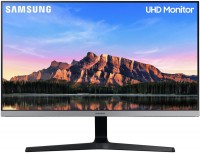
 | Outdated Product A fast multi-purpose monitor with a 28-inch 4K resolution screen, high image detail (157 ppi), fast sensor response time and low power consumption. The manufacturer is positioned as a product of the middle price category, designed for office and home use. The screen, which measures 62.1x34.1 cm, is based on an eight-bit TN matrix with a resolution of 3840x2160 and WLED backlighting without high-frequency flickering (the PWM method, which causes premature eye fatigue, is not used to control brightness). The matrix of the Samsung U28E590D monitor provides an increased brightness of 370 cd / m², a standard static contrast ratio of 1000: 1, good colour reproduction (100% sRGB) and acceptable viewing angles. The average response time of the matrix is 3.5 ms, and the minimum pixel switching time...according to the GtG scheme takes only 1 ms, which allows high-quality and without noticeable blurring to display fast movement. Guarantees flawless clarity, high brightness and good image contrast when working with texts, spreadsheets, web content, presentations and business graphics. Can be used for basic photo/video/audio processing. Suitable for 3D modeling and solving engineering problems in engineering CAD / CAE packages. It will be useful in software development processes. There are three digital ports for connection (2xHDMI 2.0 and DisplayPort 1.2). |


 |
A fast multi-purpose monitor with a 28-inch 4K resolution screen, high image detail (157 ppi), fast sensor response time and low power consumption. The manufacturer is positioned as a product of the middle price category, designed for office and home use. The screen, which measures 62.1x34.1 cm, is based on an eight-bit TN matrix with a resolution of 3840x2160 and WLED backlighting without high-frequency flickering (the PWM method, which causes premature eye fatigue, is not used to control brightness).
The matrix of the Samsung U28E590D monitor provides an increased brightness of 370 cd / m², a standard static contrast ratio of 1000: 1, good colour reproduction (100% sRGB) and acceptable viewing angles. The average response time of the matrix is 3.5 ms, and the minimum pixel switching time according to the GtG scheme takes only 1 ms, which allows high-quality and without noticeable blurring to display fast movement.
Guarantees flawless clarity, high brightness and good image contrast when working with texts, spreadsheets, web content, presentations and business graphics. Can be used for basic photo/video/audio processing. Suitable for 3D modeling and solving engineering problems in engineering CAD / CAE packages. It will be useful in software development processes. There are three digital ports for connection (2xHDMI 2.0 and DisplayPort 1.2).
|
| ||||||||||||||||||||||||||||||||||||||||||||||||||||||||||||||||||||||

Always clarify the specifications and configuration of the product with the online store manager before purchasing.
Catalog Samsung 2026 - new arrivals, bestsellers, and the most relevant models Samsung.





I have had the Samsung U28E590D for half a year now, connected via DP. I bought it to replace a 24" (AMVA+) monitor. The detail is amazing - that's what I was primarily looking for. The 1080p on the 24" initially disappointed me and I was just waiting for the moment to upgrade to something better. At first, the black color was somewhat disappointing, until I turned on 10bit (a month ago) - I was pleasantly surprised by the change. Now I couldn't be happier. The viewing angles are, of course, smaller than on the AMVA+, but either I've gotten used to it, or it's not critical, as it doesn't bother me at all (sitting 60 cm from the screen). The quality is satisfying in games and movies. In some games, the FPS has dropped to unacceptable levels (15-20), but I manage with a 1440p resolution for now, the FPS is 2-3 times more on my GTX 1066. The monitor stand is stable. The price (14.5k) for 4K in 28" is just super low. Purchased in January 2020. There are no built-in speakers or USB ports.  Andrey Gorelov: use Samsung U28E590D few months Andrey Gorelov: use Samsung U28E590D few months |
I got this 4k monitor for gaming and watching movies. Let's break down games and movies separately. Games: I knew that most games in 4k would run at 20-30 fps max for me, but still got a 4k thinking that I'd lower the resolution to FullHD for games and be happy, BUT... alas, on a 4k monitor, FullHD isn't as "native and clear" as on monitors with a maximum resolution of FullHD. To understand, go into any game and lower the resolution on your monitor by 2 notches, and you'll get FullHD on 4k. It's nonsense and disappointing) so now I have to run games on medium, sometimes even low settings in native 4k resolution, otherwise reducing the resolution blurs the image. So, for gaming, for those with a graphics card below 1080, I recommend getting a FullHD monitor. Movies: It's not all smooth with movies either. The same FullHD content on YouTube looks different. I'll try to explain) I watched the same video in FullHD quality from different bloggers on YouTube, and for someone, it looks like 480 (seriously!), while for others, it somewhat resembles FullHD. (I guess it depends on how they upload the video to YouTube). As for 4k, everything is fine!) I liked it. <--- (regarding YouTube). I downloaded a movie in 4k. Very bright picture!!! In a bad way :D. I fiddled with the monitor settings and couldn't really change anything. I fiddled with the player settings and got it right. 4k movies are awesome. Price No for this model, but in general there are a lot of questions about 4k monitors) use Samsung U28E590D few months |
The monitor from the South Korean industrial giant Samsung is one of the most affordable solutions among models that are ready to offer UltraHD screen resolution.
Minimalism
The 28-inch monitor exudes rigor and minimalism: its entire body is made of plastic, and the frame around the display is made of metal. If desired, the monitor can be hung on the wall using a 75x75 mm VESA mount. And by installing it on the table, you will be able to adjust the angle of the screen in the range from -2° to +20°.
TN+film matrix
The display with a maximum resolution of 3840x2160 pixels is based on a TN+film matrix. It covers 100% of the sRGB colour space and has a high maximum brightness threshold (370 cd/m2). During synthetic tests, the level of coverage of the sRGB space turned out to be slightly lower than the claimed value and amounted to approximately 90%, which still allows you to work closely with graphics. TN+film sensors stand out for their fast response times (1ms on this model), but the downside is their poor viewing angles (160° vertically and 170° horizontally).
Connection
In the reviews, some users note the fact that in highly dynamic game scenes, the matrix may not be able to keep up with drawing a picture in 4K format, which is solved by lowering the maximum resolution to 2560x1440 pixels or connecting the monitor to a computer via DisplayPort. In the latter case, AMD FreeSync technology becomes available for use, the meaning of which is to provide smoother frame changes in dynamic scenes. From the interfaces for connection, two HDMI ports are also available: 1.4a with a frequency of 30 Hz and 2.0 with a frequency of 60 Hz.
Picture-in-Picture
The process of controlling the monitor settings is carried out using the joystick located on the back side in the lower right side. There you can also activate the Picture-in-Picture function — this is the name for the simultaneous display of two separate windows on the screen (for example, the video from YouTube will be broadcast in the first, and the browser window will be located in the second). In general, the monitor will prove to be excellent in both home and office use scenarios.
Good to know. The correctness of colour reproduction depends on the coverage level of the sRGB colour space, which is of particular relevance when printing images processed in a photo editor. Therefore, for serious work with graphics, it is desirable to pay attention to monitors with 100% sRGB coverage. Professional models are ready to offer even greater coverage of the spectral palette visible to the human eye. For example, the LG 31MU97 and Samsung U32D970Q 4K monitors provide near perfect colour matching with the wider AdobeRGB space.