
Samsung U28R550U 28 " black
 |
 |
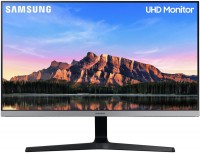
4K monitor with an eye for "clarity in every detail." This is how the model is positioned in the product line of the South Korean vendor Samsung. The "facade" of the monitor is provided with an IPS panel with a resolution of 3840x2160 pixels and support for HDR image wide dynamic range technology. The picture does not fade on the screen at viewing angles up to 178 ° in any of the planes.
The frame on three sides of the display on the Samsung U28R550UQI is almost invisible, which will come in handy when deploying multi-monitor configurations. The model has a picture-in-picture mode (displaying a signal from two different sources), an option for adaptive frame rate synchronization AMD FreeSync to avoid frame drops and image tearing. In the interface shelf of the monitor, there are DisplayPort v 1.2 and HDMI connectors of various versions (1.4 and 2.0, respectively). A 3.5 mm audio jack is provided for connecting headphones. The stand provides adjusting the position of the monitor screen only by the angle of inclination (from -2 to +15 °). The wall mounting option of the panel is possible using a VESA bracket in the dimensions of 75x75 mm.
|
| ||||||||||||||||||||||||||||||||||||||||||||||||||||||||||||||||||||||||||


Always clarify the specifications and configuration of the product with the online store manager before purchasing.
Catalog Samsung 2025 - new arrivals, bestsellers, and the most relevant models Samsung.

Buy Samsung U28R550U 28 " black
Samsung U28R550UQR - LED monitor - 4K - 28" - HDR Refurbished LU28R550UQRXEN | £204.00 |  | |||
Samsung U28R550UQR - LED monitor - 4K - 28" - HDR New LU28R550UQRXEN | £228.00 | | |||
Samsung U28R550UQP - UR55 Series - LED monitor - 4K - 28" - HDR New LU28R550UQPXEN | £246.00 | | |||
| £252.00 | | ||||
Samsung LU28R550UQU LED display 71.1 cm (28") 3840 x 2160 pixels 4K Ultra HD Flat Blue,Grey | £519.24 |  | |||




0 0 2 3 |
This monitor is just awesome and worth every hryvnia. 1. IPS panel The most important thing for me was the IPS panel, since VA, TN+Film are firstly a thing of the past, and secondly, I work with graphics. 2. I discovered the world of 4K! Interestingly, I didn't initially need 4K, but Full HD, as I mentioned, displayed text incorrectly with my laptop. After purchasing, I decided to test this 4K with some simple video and the difference is just huge! Honestly, after 4K, I will never, ever go back to Full HD! 3. Large screen size. I think there's no need to explain here. 28' will be more than enough for 80% of users. 4. High brightness and contrast. I admit, I love to "wear out" my eyes and all my monitor settings at home are maxed out to 100%. But not here. Brightness - 40%, Contrast - 60%. You know, it feels like at 100% brightness, you could burn ants without a magnifying glass. The reserve is truly massive. 5. Eye protection mode As I said, I love to "wear out" my eyes, but NOT during long text work, and this feature delighted me a lot. Essentially, it's just a blue light filter, but it also automatically lowers the brightness to a certain level. Although it's not nanotechnology, it's cool that it's included here. 6. Extremely simple interface (even grandma could figure it out) Everything here is simple, in the literal sense of the word. There aren’t +100500 incomprehensible settings options, and you can change brightness, contrast, etc., in real-time. 7. 60Hz, external power supply, and so on. For all the time using it - absolutely nothing. When I bought it, for a long time it felt like it had no drawbacks at all, BUT now I realize that I was completely right. Of course, the price of €266 is not a small amount, but it is not a downside, as the monitor fully justifies its price. Moreover, you won't find anything even remotely similar in specifications and quality for a lower price. You can check this right here on e-catalog by entering its specifications and seeing what similar items are priced at. (There is a slightly cheaper LG, but EVERY SINGLE owner complains about its reliability.) (!ATTENTION! The following text is absolutely absurd, read the next lines at your own risk!) I'm a perfectionist, but no matter how hard I tried to nitpick the smallest details, I found only this... The bottom gray stripe with the Samsung logo can sometimes get smudged with fingerprints because the power button, and therefore the settings control button, is located in the center, right under the logo. So you might accidentally smudge this stripe with your thumb while changing settings. Don't worry, this can be fixed with a special tool - a dry cloth. In extreme cases, you can use your old T-shirt from the nearby chair. (But I use microfiber solely because I have it :) )  Anton Kischuk: use Samsung U28R550U few months Anton Kischuk: use Samsung U28R550U few months |
I long debated between an LG and a Philips monitor before stumbling upon this Samsung. It's a versatile monitor with the most optimal price/quality ratio. I use it for video editing and photo retouching. It has good color reproduction and doesn't strain the eyes. I recommend it for purchase. I MADE AN UNBOXING VIDEO ON YOUTUBE https://youtu. 28", 4K, IPS, HDR10, Amd freesync, Flicker Free, factory calibration no Display Port cable included, not height adjustable  Jurec: use Samsung U28R550U less than month Jurec: use Samsung U28R550U less than month |
Bought as the main monitor for work, so I don't have to work on a 15.6-inch laptop screen at home. Primarily for business and developer tools. Connected to a MacBook... and it turned out to be a very fitting size for macOS. With scaling up to 2.5K, the image is very comfortable and convenient. Without any additional hassle with font smoothing, everything looks perfect. If you connect to a MacBook via HDMI at 4K, you'll only get 30Hz. The solution is a [censored] -> DP cable. Through it, you get a true 4K at 60Hz. - 28 inches, just a bit more than 27 :) - pricequality - neat design - easy to use - The backlighting on the sides isn't very even, noticeable only on a white background and only if you really look closely... it's not noticeable at all unless you're hardcore working with graphics. I only noticed it at the moment of connection... after that, I don't even notice it. - The VESA mount platform is quite small and only fits 75*75 mounting "plates" since there's a "step" right after the top holes. But since most of the "plates" used to hang monitors are universal and 100mm wide, you either have to find some washers or mount it with a slight tilt (meaning the mounting plate doesn't fully adhere to the monitor's surface). Vitaliy Dobrolezha: use Samsung U28R550U less than month |


A 4K monitor under the umbrella of affordability is not a myth, but a reality embodied in the Samsung U28R550UQI model. Against the background of peers, it stands out with an “extra inch” in diagonal screen size, which allows you to display a little more useful information.
Caliber 28"
The 28-inch diagonal display displays a high-resolution 4K image (3840x2160 pixels) and supports HDR image wide dynamic range technology. The corresponding content on the monitor screen will shine with bright colours. And in order to avoid dropping frames and tearing the picture during signal transmission, the Samsung U28R550UQI has acquired support for AMD FreeSync.
Interfaces
A useful “picture-in-picture” option allows you to display an image on the model screen from two sources at once(for example, a desktop computer and a laptop). External devices are connected to the monitor via HDMI ports (one version 1.4 and one generation 2.0), as well as a DisplayPort v 1.2 connector. In addition, the user is provided with a 3.5 mm mini-Jack interface for wired headphones. But the monitor does not have its own speakers.
Complete dominance
The monitor stand only allows the screen to be adjusted in tilt (from -2° to +15°). On its stand there is a clamp for a bundle of connecting wires. At the same time, the model has an external power supply unit and a "kruglyash" on the back with mounting holes VESA 75x75 mm for a wall bracket. Due to the narrow mounting point, the monitor has difficulty in compatibility with the brackets. But thanks to the high image resolution and excellent colour reproduction, the positive qualities of the model completely dominate the negative factors in the design.






That’s all you can say about this monitor.
I needed a monitor for comfortable work with large text arrays, as well as for graphics (and to play The Witcher on Friday night). Let me say right away, this isn't an ad))). But seriously, I took quite a long time looking at all sorts of different monitors, first on websites, on the e-catalog, and that's when I found this model, but the price was a bit high. Then I decided to look for something interesting on the displays of my hometown. Generally, items like monitors shouldn’t be bought online, only in person, because through the screen you can't really evaluate the true image quality or pixel grid size. After visiting almost all supermarkets and shopping centers, I checked out other monitors, much cheaper ones, but I had to see everything... And then, entering yet another store, I stumbled upon this very monitor! And only then did I understand the true value of this monitor. The thing is, I wanted to use it as an additional monitor for my laptop, after all, 28" versus 17" is a big difference. But with most HD monitors, when connected, the text becomes completely unreadable, and almost none of the cheaper ones suited me. With this one, it’s the opposite! The picture is simply incredible, the text is clear, and the colors are about 40 times more saturated than on my laptop (thanks to the IPS matrix). And this is just on the store display, without any additional settings! Long story short, I went home empty-handed (decided to "sleep on it" and decide the next day). But even that day, I knew I would buy this very monitor. Now it is my MAIN monitor.