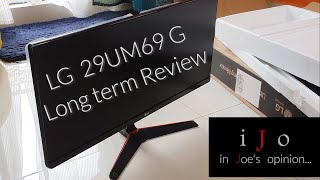
LG 29UM69G 29 "
 |

 |
Ultra-wide 29-inch monitor based on a high-quality IPS-matrix with an aspect ratio of 21:9. The model is aimed at home use and is positioned by the manufacturer as a monitor for multimedia entertainment and computer games. In addition, this aspect ratio is convenient for creating and editing audio and video content. The screen has a resolution of 2560x1080 and a pixel pitch of 0.263 mm.
This provides a fairly detailed image, which, however, does not make you strain your eyes when working with small fonts or tiny elements of the game interface, as is the case with Ultra HD models. The screen is made on the basis of an 8-bit (using the FRC method) IPS-matrix with Flicker-Free W-LED backlighting. It is devoid of the flickering effect that adversely affects vision and supports Low Blue Light technology, which filters out the short-wave blue part of the spectrum that is most unpleasant for the eyes.
The minimum screen response time of the LG 29UM69G monitor is 5 ms (when switching a pixel from grey to grey), the average is 14 ms (from black to white). These figures, together with the work of Motion Blur Reduction technology, provide high-definition display of fast movement, which is especially important for fast-paced computer games. Additional comfort in this matter creates support for dynamic synchronization of the screen refresh rate with an AMD FreeSync graphics card. The monitor can be connected to a computer or laptop using HDMI 1.4, Display Port 1.2 and USB Type C connectors.
|
| ||||||||||||||||||||||||||||||||||||||||||||||||||||||||||||||||||||||||


Always clarify the specifications and configuration of the product with the online store manager before purchasing.
Catalog LG 2026 - new arrivals, bestsellers, and the most relevant models LG.





1 1 4 1 |
i bought this monitor but regret switching from 27 inches to it. a regular monitor, just wider. AMD FreeSync technology. DisplayPort output. very poor build quality. Flimsy plastic. Gaps between the body and the screen are 1mm. You can see the clips, which are few, and when you lightly press on the screen, it bends inward, indicating a gap. Glossy plastic. The screen is not very bright. I had to adjust the colors using a calibrator. And the price on top of that was even more disappointing. I bought it twice because the first one had a dead pixel.  sergey: use LG 29UM69G less than month sergey: use LG 29UM69G less than month |
Half an hour later, my eyes started to hurt. I turned the brightness to minimum, and they hurt even more. I learned about Pulse-Width Modulation and felt a bit smarter. For some reason, only after purchasing did I closely look at the specifications and discovered that this wonder's panel (to avoid having my comment erased, I'll put it gently) is terribly subpar, 6-bit + FRC (which means it flickers a bit more, on top of PWM), a minimum response time of 5 ms, plus an input lag of 10 ms. (Not that it's much, you'll manage, but what about gamers with such latency, and that's only by the numbers, in reality, ghosting is quite noticeable.) In short, it's only suitable for watching movies. Svyaznoy didn't take it back, claiming it's a complex technical device, so I bought a proper monitor made for people; even after a decent price drop, I still can't sell this wonder. To be fair, the 6-bit is only for this screen size, the next ones are honest 8-bit, but they don't cost as much. I left this review on Svyaznoy's website, but they quickly deleted it. Design. Flashing |
It wasn't for nothing that I didn't rush to switch from my old 22-inch monitor with a resolution of 1680x1050 to a regular FullHD. The resolution difference was small, so it didn't make much sense. It's a whole different story transitioning to 2560x1080 with a 29-inch diagonal. At such a resolution and screen size, it's convenient to work, and many games look great. I often use my home computer for work, and since I usually work with texts on web pages, Google Docs, and Word, the usefulness of a wide screen can't be overrated. I simply open two, often three, and sometimes four windows, and all the necessary materials are right at hand. Everything is clearly visible, down to the last comma, apostrophe, and hyphen. I must note that for such work, it's important to properly adjust the brightness and contrast of the screen. Because the rich and bright settings of this monitor "out of the box" are as eye-burning as electric arc light. But once you reduce the color temperature, cut the brightness in half, and lower the contrast, you can sit in front of the monitor for hours without interruption. I was particularly pleased with the price. For such a large and high-quality screen, the money was well worth it. There is no height adjustment, only screen tilt angle adjustment on the transverse plane. Since I really wanted to raise the screen for convenience, I had to craft a "stand-for-a-stand" )) The glossy case should not be touched with hands, as smudges are left even from a light touch, and removing them afterward is quite the hassle. There is some uneven backlighting, which, however, you really have to strive to see. |
LG 29UM69G configurations
| Price for LG 29UM69G | ||||
|---|---|---|---|---|
| LG 29UM69G 29 " | from £353.90 | 2 offers | |
 | LG 34UM69G 34 " black | from £507.90 | 5 offers | |